Unofficial guide. wburgermenus.com is an independent website and is not affiliated with, endorsed by, or connected to Whataburger Restaurants LLC. The guest survey itself is run by Whataburger at whataburger.com/company/survey. This page only explains how it works.
WhataBurgerVisit (often written as WhataburgerVisit or WhataburgerVisit.com) is the name many guests use for Whataburger’s guest satisfaction survey. It’s designed to collect quick, honest feedback from guests who recently visited a Whataburger restaurant.
- Purpose: Improve food quality, service speed, cleanliness, and overall guest experience.
- Who it’s for: Recent diners with a valid receipt (survey invitation/QR code or restaurant number).
- What you get: A reward for completing the survey—commonly a free menu item with purchase, sometimes an entry into a sweepstakes. Rewards rotate over time and can vary by location and date.
How the Survey Works
| Topic | Quick Answer |
|---|---|
| Official access | Go via Whataburger.com → Company → Survey (often shown as whataburger.com/company/survey). |
| Receipt required | Yes, for the reward survey. You’ll use a survey code/QR or the restaurant number from the receipt. |
| Languages | English or Spanish (select on the first page). |
| Time limit | Typically within 3–5 days of your visit (check the fine print on your receipt). |
| Reward | Often a free item with purchase (e.g., free Whataburger with purchase of medium fries + medium drink) or sweepstakes entry—varies by location/time. |
| Delivery | A validation code shown at the end of the survey and/or a reward sent to your email or loaded into the app. |
| Who can participate | Usually U.S. residents, 18+, one survey per receipt; employees/households excluded. Always see official rules on the survey page. |
Eligibility & Rules
Whataburger sets simple rules so the process is fair and the data stays accurate. The points below summarize common conditions (always confirm the exact wording on your receipt or on the official survey page):
- Recent visit required: Your receipt is your invitation; look for the survey code or QR code (or use the restaurant number at the top).
- Time window: Complete the survey within 3–5 days of the visit.
- Residency & age: Typically U.S. residents who are 18+.
- Limit: One survey per receipt. Multiple surveys require new receipts.
- Employees: Employees, agents, and family/household members are generally not eligible.
- Reward specifics: Rewards rotate and can vary by location and date; read the offer terms at completion.
Quick Eligibility Table
| Requirement | Typical Standard |
|---|---|
| Valid purchase receipt | Required for the reward survey |
| Time to respond | 3–5 days after visit (check receipt) |
| Residency / Age | U.S. residents, 18+ |
| Number of entries | 1 per receipt |
| Employees eligible? | No |
| Reward type | Free item with purchase or sweepstakes entry (varies) |
What You Need Before You Start
- Your receipt with a survey invitation (QR code) or the restaurant number at the top.
- A few minutes (most guests finish in 3–5 minutes).
- Stable internet on your phone or computer.
- Pen (optional): If you receive a validation code, you’ll write it on your receipt to redeem.
Step-by-Step: How to Take the Whataburger Survey
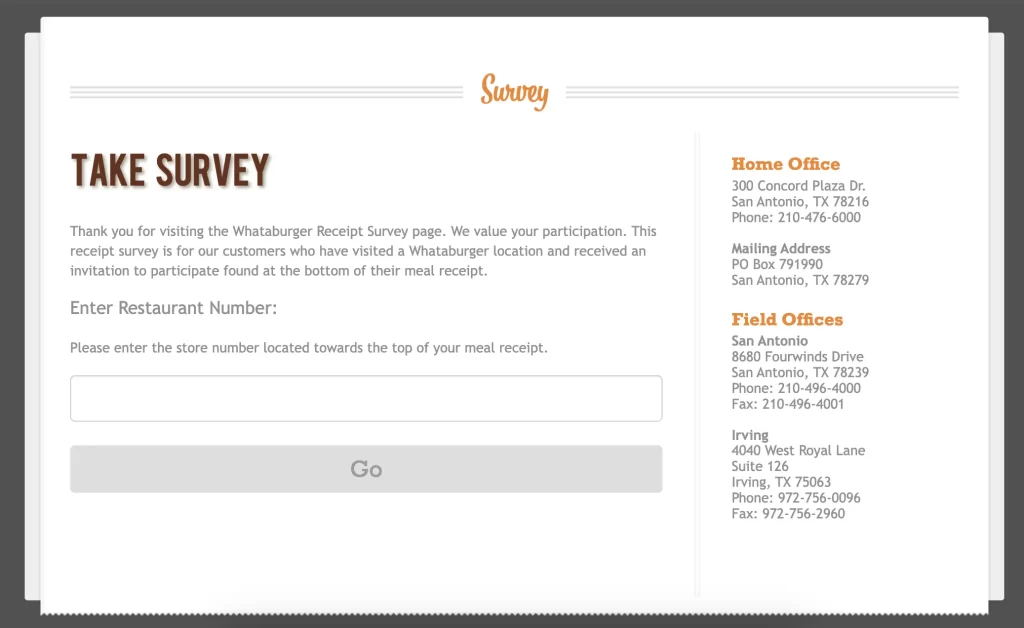
- Find your receipt.
Confirm you have either a QR code/survey code or the restaurant number near the top. - Go to the official survey page.
From the Whataburger website, navigate to Company → Survey (often shown as whataburger.com/company/survey). You may also reach the survey by scanning the QR code on your receipt. - Choose your language.
Select English or Español. - Enter the required info.
- If prompted for restaurant number, type it exactly as printed.
- If prompted for a survey code, enter it carefully (watch zeros vs the letter “O”).
- If using QR, your phone should open the survey in your browser.
- Answer the questions honestly.
Expect 1–5 rating scales and a few multiple-choice prompts covering food quality, order accuracy, speed of service, friendliness, cleanliness, and overall satisfaction. There’s usually an open comment box—use it to call out specifics (great or not-so-great). - Submit and capture your reward.
- If a validation code appears, write it on your receipt and follow the redemption instructions printed there.
- If the reward is emailed or loaded to your app, check your inbox/app offers shortly after.
- Redeem on your next visit.
Bring the receipt + validation code (or show the app reward) and complete any purchase requirements (e.g., buy a medium fry + medium drink to get the free item).
No Receipt? Your Feedback Options
You cannot complete the reward survey without a receipt. However, you still have ways to be heard:
- General feedback form: Use Whataburger’s online Customer Care/Contact form to share feedback (no reward).
- Customer Care phone: Call 1-800-6BURGER (1-800-628-7437) for formal complaints or detailed issues.
- App-triggered surveys: If you ordered through the Whataburger app, you may occasionally receive a post-purchase survey email with a reward that’s added to your app offers. This is not guaranteed for every order, but it’s a nice perk when it appears.
Rewards You Can Earn (and How They’re Delivered)
Rewards rotate and may vary by location/date. Historically, the most common perk is a free item with purchase (often a free Whataburger with the purchase of a medium fry and medium drink). Other past examples have included:
- Free breakfast item (with purchase)
- Free small shake (with purchase)
- Free Whatachick’n item (with purchase)
- WhataWings offers (with purchase)
- Sweepstakes entry (e.g., $1,000 gift card drawings—when active)
Reward Delivery Channels
| Delivery | What to Expect | What To Do |
|---|---|---|
| Validation code (on-screen) | Code appears at the end of the survey | Write it on your receipt; present it on your next visit per instructions |
| Offer or coupon sent to your inbox | Save the email; follow the redeem instructions in-store or online if supported | |
| App | Offer loads into Whataburger app → Rewards/Offers | Open the app at checkout and apply the reward |
Always read the fine print attached to your specific offer (expiry date, purchase requirements, participating locations, dine-in/drive-thru eligibility, etc.).
What Questions Are on the Survey?
While the exact questions can change, you can expect a quick set of topics like:
- Food quality: Taste, temperature, freshness, order accuracy
- Service speed: How quickly your order was taken and delivered
- Staff friendliness: Courtesy, attentiveness, problem-solving
- Cleanliness: Dining area, restrooms, counters, exterior
- Overall satisfaction: Likelihood to return and to recommend
- Open comments: What stood out (good or bad), what to improve, staff shout-outs
Most questions use 1–5 rating scales plus a few multiple-choice items, so you’ll finish fast.
Troubleshooting: Codes, QR, App & Email Issues
“My QR code won’t scan.”
- Try moving your phone closer/farther; ensure good lighting.
- If your camera opens the Whataburger app instead of the browser, close the app and scan again—the survey works best in your web browser.
- Alternatively, open the survey via the Company → Survey link on Whataburger.com and use the restaurant number from your receipt.
“The website says my code is invalid.”
- Double-check the restaurant number or survey code (zeros vs letter “O”, 1 vs I).
- Confirm you’re still within the 3–5 day window printed on the receipt.
- Try a different browser/device and ensure your internet is stable.
“I finished the survey, but I didn’t get my reward.”
- If the site displayed a validation code, that is your reward—write it on the receipt immediately.
- If your reward was supposed to be emailed, check spam/junk folders and allow a short delay.
- App rewards may take a little time to appear. Force-close and reopen the app.
- Still stuck? Contact the restaurant manager or Customer Care (1-800-6BURGER) with your receipt details and date/time.
“Can I use screenshots instead of the receipt?”
- In most cases, no. The receipt + validation code (or a live app reward) is the standard for redemption. Always follow the exact instructions on the offer.
Pro Tips to Maximize Your Rewards
- Complete the survey ASAP.
Don’t miss the 3–5 day window. Doing it the same day takes minutes and locks in your reward. - Read the offer fine print.
Check purchase requirements, expiry date, and whether the reward is valid in drive-thru or dine-in. - Stack smart with app rewards.
Keep an eye on your Whataburger app Offers/Rewards. While stacking rules vary, having multiple options helps you plan better value visits. - Be specific in your feedback.
Not only does this help the team fix issues faster, but detailed feedback can improve future offers and service quality at your local store. - Join Whataburger Rewards.
App users sometimes receive post-purchase survey emails and bonus offers. It’s the easiest way to catch extra value and track your perks.
Privacy, Data & Security
- Your feedback is tied to a single visit. Whataburger typically uses survey responses for quality control and trend analysis.
- Data usage: Aggregated insights guide training, menu decisions, and operations.
- Your info: If you provide an email for reward delivery, it’s used to send your offer and (if you opt in) relevant communications. Review Whataburger’s privacy policy for the current details.
How Whataburger Uses Your Feedback
Your survey results don’t vanish into a black hole—they inform real actions:
- Performance tracking: Spotting patterns (e.g., repeat mentions of slow drive-thru) so managers can fix bottlenecks.
- Targeted training: Coaching teams on speed, accuracy, hospitality—right where it’s needed.
- Recognition: Shout-outs in comments help highlight standout team members.
- Menu & service enhancements: Gauging popularity, identifying misses, and shaping future items or limited-time offers.
- Marketing insights: Understanding loyalty drivers and tailoring promotions.
Store Locator & Customer Care
- Store Locator: Use Whataburger’s official Locations page or Google Maps (“Whataburger near me”).
- Customer Care: Prefer to talk to a person? Call 1-800-6BURGER (1-800-628-7437) or use the Contact form on Whataburger’s site for detailed help, compliments, or complaints (receipt or no receipt).
FAQs
1) Can I take the Whataburger survey without a receipt?
Not for the reward survey. Without a receipt, you can still submit general feedback via Whataburger’s website or call Customer Care (1-800-6BURGER). App users may occasionally get post-purchase email surveys when ordering through the app.
2) Where exactly do I find the restaurant number on my receipt?
It’s typically printed toward the top of the receipt and may be labeled as “Restaurant #” or “Store #”. Enter it exactly as printed.
3) My QR code opens the Whataburger app, not the survey page—what do I do?
Close the app, then open your phone’s web browser and either scan again or navigate through Whataburger.com → Company → Survey. The survey is designed for the browser.
4) How long do I have to complete the survey after my visit?
Usually 3–5 days from the visit date (check your receipt). Completing the survey same day is safest.
5) What reward will I receive?
The most common reward is a free item with purchase (for example, a free Whataburger when you buy a medium drink + medium fries). Rewards vary by location and date and may include sweepstakes entries when active.
6) How do I redeem a validation code?
Write the code on your receipt as instructed. Present it on your next visit and complete the listed purchase requirement (if any). The cashier will validate the offer.
7) Can I redeem the reward in the drive-thru?
Often yes, but it depends on offer terms and location. Check the fine print—some offers specify dine-in or drive-thru.
8) Do I have to provide my email to get the reward?
Not always. If the survey shows a validation code, that’s sufficient. If the reward is emailed or sent to your app, you’ll need a valid email/account.
9) The site says my restaurant number or survey code is invalid. Why?
Common causes: typo (0 vs O, 1 vs I), expired window (past 3–5 days), or connectivity issues. Re-enter carefully, try another browser, and confirm the date on your receipt.
10) Will multiple surveys get me multiple rewards?
You can complete one survey per receipt. To earn additional rewards this way, you’ll need new receipts from new visits.
11) Do employees or their families qualify?
Generally no—employees, agents, and household members are excluded. Always consult official rules for the current policy.
12) How long does the reward stay valid?
Expiration dates vary. Check the offer’s fine print or your email/app details. Use the reward well before it expires.
13) Does the reward cover the entire meal?
Typically the reward is for a specific free item with purchase, not the entire order. You’ll usually need to buy a medium drink + medium fries (or whatever the offer specifies).
14) Can I combine the survey reward with other coupons or app offers?
Combining/stacking may be restricted and often varies by location. Ask the cashier or check the offer terms.
15) What if the staff can’t apply my reward?
Remain polite and ask to speak with a manager. Have your receipt, validation code, and date/time handy. If needed, follow up with Customer Care.
16) Is the survey available in Spanish?
Yes. Select Español on the first screen.
17) What kind of questions should I expect?
Primarily 1–5 rating questions on food quality, speed, friendliness, cleanliness, accuracy, plus an open comment box for specifics.
18) Why does Whataburger offer rewards for survey completion?
Your feedback fuels training, menu/service improvements, and operational fixes. The reward encourages return visits while showing appreciation for your time.
19) Can I transfer my reward to someone else?
Policies vary; most offers are intended for the guest who completed the survey. See offer terms or ask the restaurant.
20) Is there ever a sweepstakes attached?
At times, yes (e.g., gift card drawings). These promotions come and go. Always read the current official rules on the survey page.
Final Take
WhataBurgerVisit is the official Whataburger survey that transforms your recent visit into a chance for free food with purchase or even a sweepstakes entry (when active). The process is quick—3–5 minutes—and the path is simple:
- Keep your receipt.
- Visit Whataburger.com → Company → Survey (or scan the QR).
- Enter the restaurant number/survey code, choose your language, and answer honestly.
- Grab your reward (validation code, email, or app offer) and redeem before it expires.
Whether your last order was perfect or needs a tweak, your feedback matters—and Whataburger thanks you for it. Enjoy your next visit (and that freebie)!